The Advanced Selection Based question type is an exclusive feature of SurveyCake ENTERPRISE. It offers the flexibility to use custom options as well as options from other choice questions as options for the current question. This empowers you to create more intricate survey questions, such as dynamically generating options based on respondents' answers. This helps avoid cluttering the layout with a large number of repetitive options.
In simpler terms, the Advanced Selection Based question type is ideal for the following scenarios:
When you need to dynamically adjust the options of the question based on respondents' answers.
When you want to utilize the options from an "Other" question as options for the current question.
Let's take an example to illustrate this:
Imagine you're the manager of a buffet restaurant, and your company plans to introduce a new "Asian Cuisine" section. Before the launch, you want to survey the market's preferences for Asian cuisine.
Here's how you can structure your survey:
Q1. Have you heard of the following Japanese dishes? (Multiple choices allowed). Options: Tuna Belly Sushi, Crab Paste Hand Roll, Sea Urchin Sushi, Salmon Roe Sushi.
Q2. Have you heard of the following Hong Kong-style dishes? (Multiple choices allowed) Options: Pineapple Bun with Butter, Crispy Roast Pork, Creamy Piggy Bun, Hong Kong-style Fish Congee, Yunnan Rice Noodles
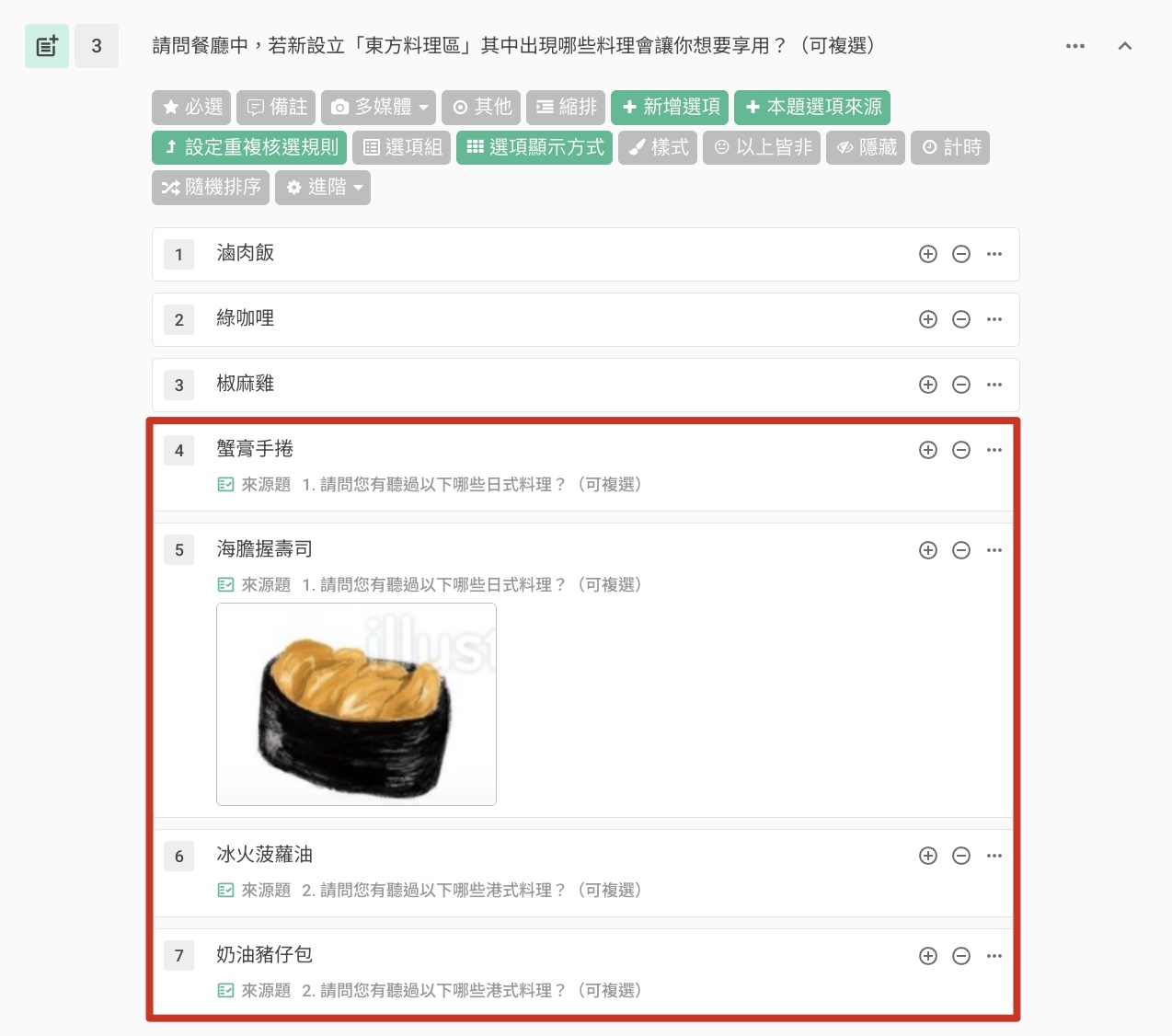
Q3. Which dishes from the "Eastern Cuisine Section" in the restaurant would you be interested in trying? (Multiple choices allowed) Options: Include "Crab Paste Hand Roll," "Sea Urchin Sushi," "Pineapple Bun with Butter," "Creamy Piggy Bun" Create "Braised Pork Rice," "Green Curry," "Pepper Chicken"
In this example, the third question includes both the self-created dishes and the options from the previous two questions. This allows you to gauge respondents' preferences for the known Japanese and Hong Kong-style dishes, as well as the other dishes in the newly established "Eastern Cuisine Section."
The key distinction between the Advanced Selection Based and Selection Based question types lies in the level of customization. With the Selection Based question type, you can only passively select the options chosen or not chosen by respondents, without the ability to customize the options.
How to use Advanced Selection Based question type?
Create Q1 and Q2 Questions
Add a new "Advanced Selection Based" question, then click "Option Source" to configure the options.
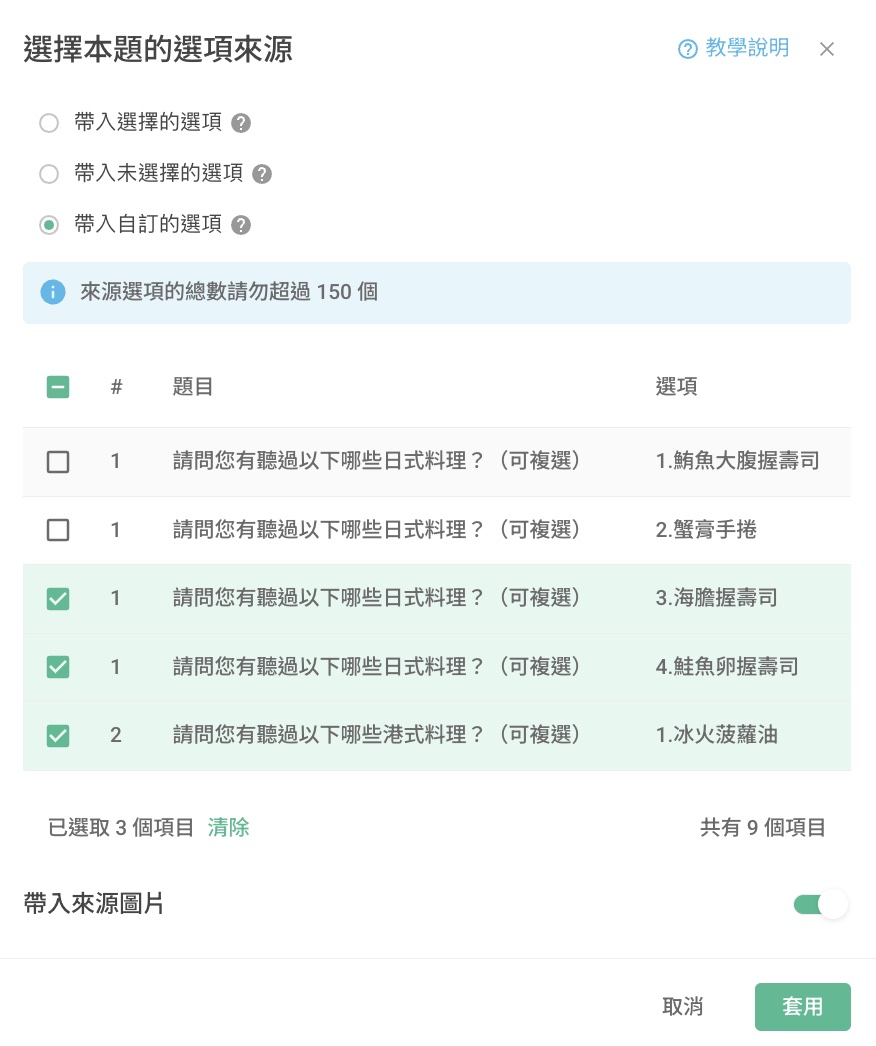
Choose the source option to apply. If you select the 'Custom Option', please check the options you wish to apply and then click the 'Apply' button. If you would also like to 'import the source image', please enable the 'Import Source Image' feature. Once done, click the 'Apply' button to complete the settings.
Please note: Only one option source can be selected, and please fill in according to the rules.
The "Import selected options" and "Import unselected options" are functionalities specific to the Selection Based. To delve deeper into this topic, we recommend checking out our tutorial article on Selection Based questions titled "Selection Based: Import custom options". The options you select for the single/multiple choice question will serve as the options for this particular question.
Please take note of the following:
The total number of options for the source option should not exceed 150.
The "N/A option" will not be included.
The question types that can be included and will appear in the list are: Multiple Choice, Checkboxes, and Advanced Selection Based.

Frequently Asked Questions
Where will the customized options be displayed?
The customized options will be shown after the existing options and before the special options "Other" and "N/A option".
Will the content of customized options be updated when the source options are modified or deleted?
The content of customized options will not automatically update if the source options are modified or deleted. They only copy the content of the options at the time they are created. Changes to the source options will only appear when the survey is saved or finalized. Therefore, if the source options are changed or removed, the customized options will not update until you save the survey.
For instance, if you modify the options in a question, changing the first option from "Crab Stick Hand Roll" to "Crab Stick Sushi Roll" and deleting the option "Creamy Piggy Bun" in the second question, the options in the third question will still retain the original options "Crab Stick Hand Roll" and "Creamy Piggy Bun". In this case, you will need to manually update the options to "Crab Stick Sushi Roll" and delete the option "Creamy Piggy Bun" in the backend.
If you are interested in this feature, please Contact Us for more information.
Summary
The Advanced Selection Based feature offers enhanced flexibility, allowing you to create more intricate survey questions. This feature saves you valuable time by eliminating the need for repetitive option settings.



