


No More Chaos Running Events. SurveyCake Makes Data Research and Analysis Simple
Maximizing the value surveys bring to users and providing more professional, attentive service has always been SurveyCake's goal.
To share a wider range of survey applications and help users across fields unlock SurveyCake's value, we interviewed enterprise users from various industries about their experience and how they use SurveyCake to advance their business goals. We are deeply grateful to these industry leaders for their generous feedback, which helps us keep improving our service.
Bridging the Gap, Between Sellers & Buyers
awoo is Taiwan's number one MarTech company in SEO and email marketing. Our Marketing Platform has been registered and used by over 13,000 businesses, and we have an AI Lab staffed by more than 10 scientists.
We use AI to deeply understand product content and context, combining that AI-derived data with user behavior journey data and applying it across the full AARRR e-commerce marketing cycle, offering Asia's first marketing platform built around "product understanding," the Product Data Platform (PDP).
From SEO to AI, awoo draws on deep domain expertise to build MarTech that fits user needs. To help users across industries understand the importance and applications of MarTech, awoo regularly holds events and seminars.
How does awoo use SurveyCake to effectively manage event registration and analyze the feedback it collects?

Before SurveyCake
Q: What was your original survey method?
We used to design event surveys with Google Forms, but its templates were very basic and not visually appealing, which wasn't great for spreading our brand image or for the participant response experience.
There was also the hassle of tabulating results. A single event might have multiple sessions running at the same time, and participants would sign up for whichever topics interested them, so not everyone attended every session. This made surveying with Google Forms troublesome, since we couldn't efficiently segment respondents within one survey so that people who attended a specific session only answered questions about that session.
"SurveyCake's survey interface is attractive and intuitive to fill out."
Q: Why did you choose SurveyCake?
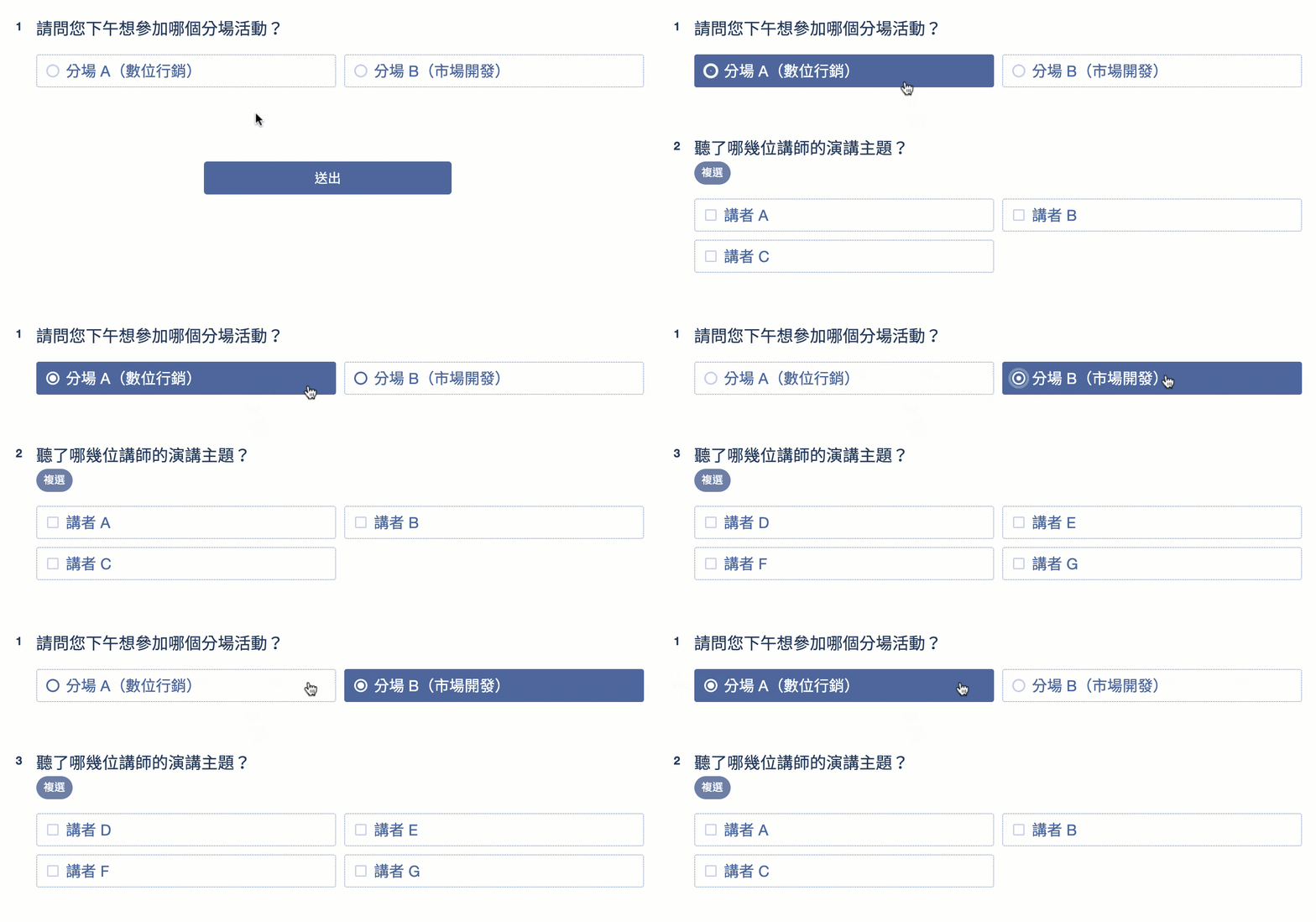
SurveyCake's layout isn't just attractive; its skip logic also successfully solved our response experience problem, letting respondents focus only on the questions relevant to them, making the layout cleaner and the response process more efficient.
"A must-know feature for survey design, skip logic, gives a friendlier response experience and makes survey design more intuitive."
After SurveyCake
Q: How do you design and promote your event satisfaction survey?
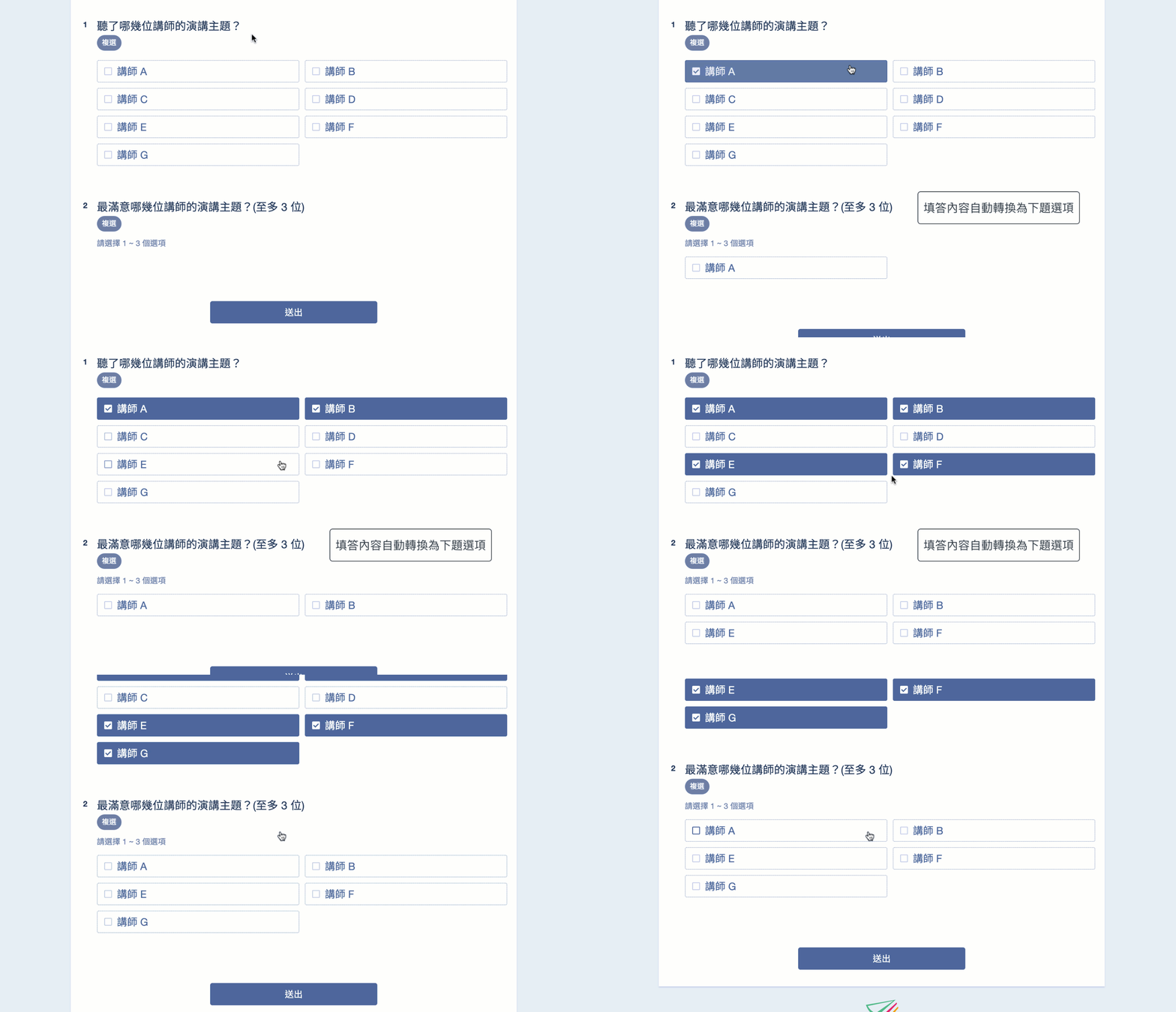
We use the piping question feature to ask participants about their satisfaction with each speaker, and this feature is genuinely great to use. Once a respondent selects specific options, the system automatically carries those selections into the following question, letting respondents confirm they selected correctly while also asking about satisfaction intuitively.
For example, if an event has 10 speakers, we ask respondents which speakers they listened to. After a respondent selects 3 out of the 10, we then ask about their satisfaction with just those 3, which is intuitive and efficient, and their responses are easy to review in the dashboard.
For collecting feedback, we distribute the survey link in the online platform chat, an anonymous chat system, and LINE discussion groups for participants to fill out, using the speaker's slide deck as an incentive to respond.
"Piping questions let us track response behavior in depth."
Q: How do you analyze and apply the responses collected?
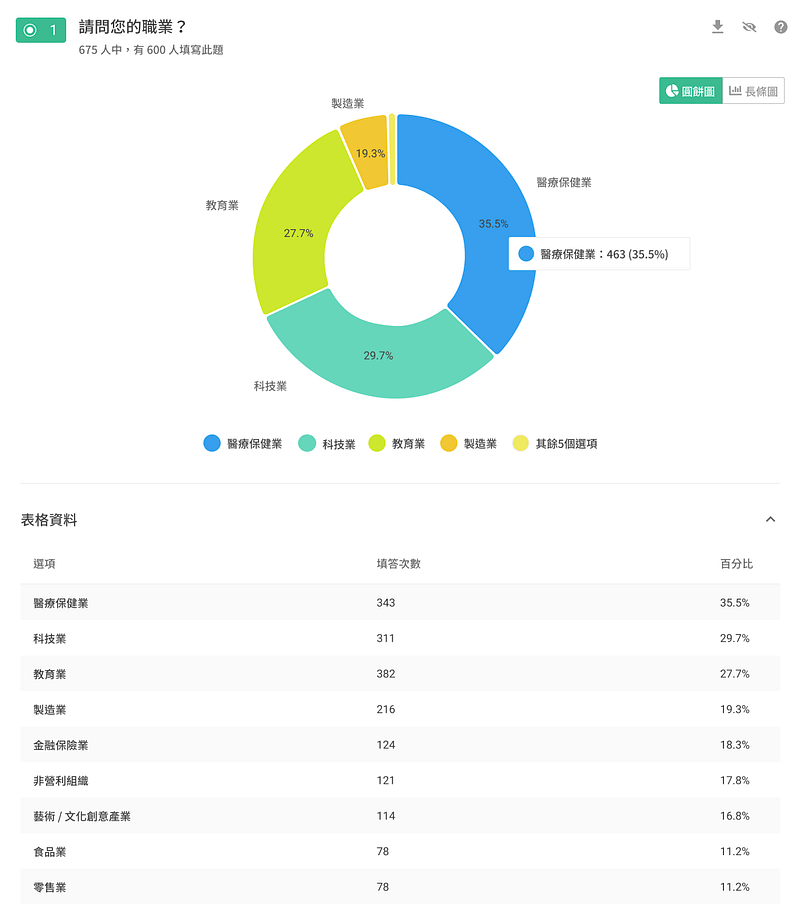
SurveyCake's statistical charts feature is fantastic. The system automatically generates visual charts from responses, letting us quickly grasp the distribution of answers. Just hovering the cursor over a chart switches the display to show each option's share of results.
After an event ends, management wants to know attendee satisfaction right away, so we pair this with the Share Charts feature, sending a public chart link to leadership. They just click the link to see the full distribution of statistical charts, with no need to log into the dashboard at all, which is incredibly convenient.
Finally, for qualitative analysis, we export responses to Excel, for questions like which speaker's talk could have been better, and dig deeper into the responses in Excel.
"Visual statistical charts give a quick grasp of response distribution, and Share Charts makes it easy to share results with teammates."
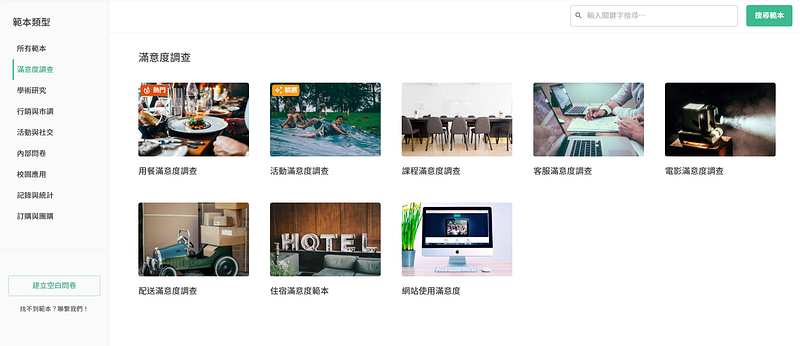
Q: What costs has SurveyCake saved awoo?
SurveyCake saves us at least 2 to 3 hours each time, and the free templates in the dashboard help enormously. We can pick and apply a suitable template directly, and the preset questions inside it also serve as a reference, letting us check whether we've missed a question or need to ask respondents something further.
So in a way, I feel SurveyCake also plays an educational role, showing us what's possible with surveys, which gives users a real sense of comfort and confidence.
A Word for SurveyCake
Q: What is SurveyCake's most practical feature?
Beyond piping questions, statistical charts, and Share Charts, the survey expiration date and thank-you page redirect are also really useful.
The survey expiration date lets us set the window during which the survey stays open. Once that time passes, the survey closes automatically. We use the speaker's slide deck as the incentive, so anyone who responds within the window receives it. The expiration date makes it easy to control the survey's status, avoid the awkward situation of late responses, and means we don't need to keep checking the dashboard after the event, or worry about forgetting to close the form and causing a dispute.
The thank-you page redirect is also a great traffic-driving feature. We usually put our blog subscription link or an offline forum's event page there, so after finishing the survey, participants are guided to our blog or event page for further conversion or marketing communication. Beyond traffic, the redirect can also serve as a great incentive, for example putting the speaker's slide deck behind the redirect button so attendees can download it right after completing the survey, raising the response rate.

Q: What do you like most about SurveyCake?
It genuinely saves us a lot of time in survey flow design, especially by offering multiple distribution channels for the survey: link, embed code, and QR code, letting us spread the survey across every channel, which is really thoughtful.

For example, generating a QR code for attendees to scan during an event: when we used Google Forms, we had to separately open a QR code generator to turn the link into a code, which was fiddly and annoying. SurveyCake skips all of that. The dashboard automatically generates a QR code, and we just display it on the event's rotating display wall for participants to scan.
For the survey link, we don't even need to shorten the URL separately. We just copy and paste it directly into a LINE group and start collecting feedback automatically, which I think is a really thoughtful touch.

Optimizing Event Flow, Effortlessly Tracking Event Satisfaction
Our thanks to awoo for taking the time to share their experience and candid feedback, helping us understand the platform's current strengths and weaknesses so we can deliver a better survey service. As a success story, it also shows peers how to use surveys for feedback collection and effectively raise response rates.
Sign up for a free SurveyCake account today. Build your own event registration form or satisfaction survey, understand what respondents are really thinking, and find real insight in your data.
